FOR PRODUCERS & SUPERVISORS
OpenBID Client
Get every vendor on the same page. Send consistent breakdowns and compare bids, shot by shot.
- Shot and asset bid comparisons
- Vendor breakdowns and bid history
- NDAs and production tech memos
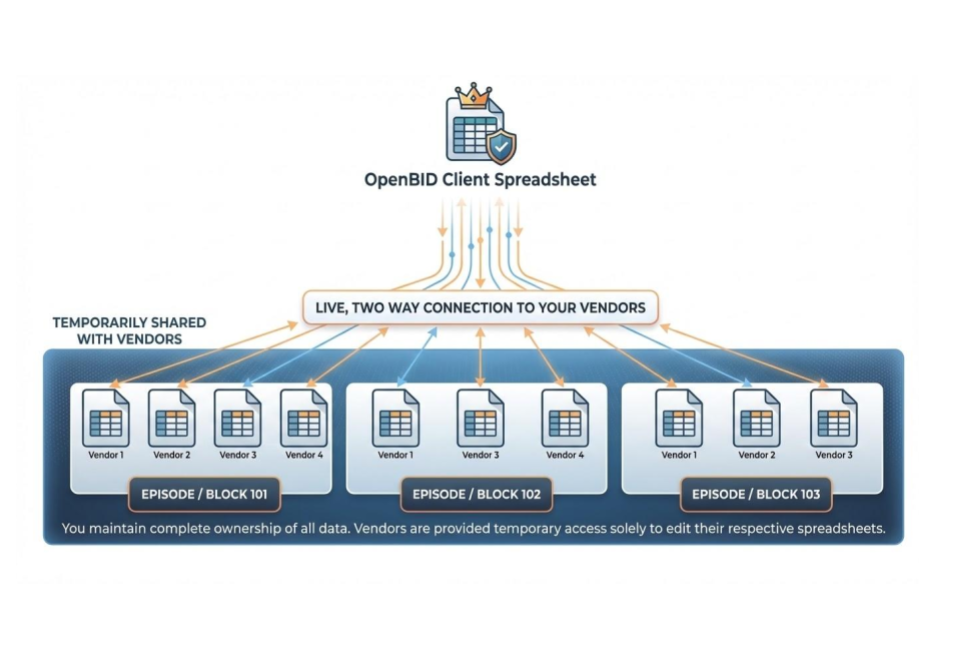
Built for VFX. Built on Google Sheets.
Less spreadsheet wrangling. More time for the work that matters. Build breakdowns, compare vendor bids, and plan your crew in one connected workflow.
Free templates with sample data. Your familiar Google Sheets.
| Shot / Description | Studio A | Studio B |
|---|---|---|
| 010_020City extension | $4,200 | $3,800 |
| 010_030Sky replacement | $1,200 | $1,450 |
| 020_010Rig removal | $850 | $800 |
Compare the detail. See the difference.
| Department | Artists | Planned days |
|---|---|---|
| Compositing | 4 | |
| CG & lighting | 3 | |
| Roto & paint | 1 |
Connect your bid to the people behind it.
Built with feedback from VFX teams.
With thanks to our early testers.





TWO SIDES. ONE SHARED LANGUAGE.
Whether you commission the work or create it, start with a template that understands your day.
Get every vendor on the same page. Send consistent breakdowns and compare bids, shot by shot.
Turn the creative brief into a considered bid. Connect shot costs, crew plans, and cash flow.
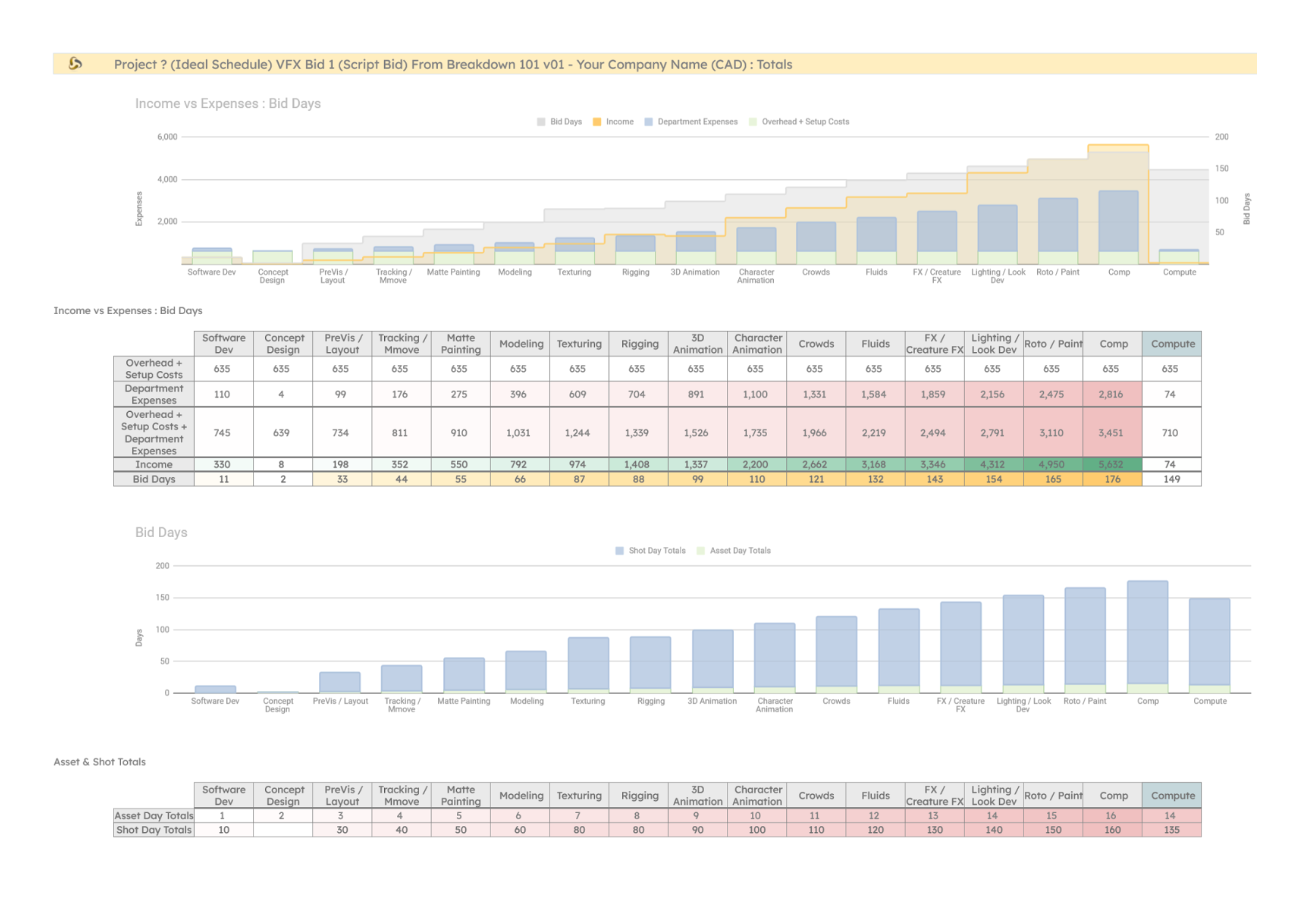
The templates are your starting point. Add OpenBID Studio for the connected Google Workspace workflow.
FROM FIRST BREAKDOWN TO FINAL BID
Copy a Client or Vendor template, open it in Google Sheets, and install the OpenBID Studio add-on.
Define shots and assets. Add assumptions, department rates, and the information your collaborators need.
Send vendor breakdowns, compare line items, or prepare a client-ready bid with the matching workflow.
FROM PEOPLE WHO DO THE WORK
A bidding workflow should make your day simpler. Here is what OpenBID users have to say.
“Being built on Google Sheets, which we all already use anyway, makes it incredibly easy and the addition of ChatGPT is just the cherry on top!”
 Brian ConnorVFX Supervisor · Dune
“Its integration with Google Sheets is easy to use. Shot templates, cash flow projections, and crew planning, plus ChatGPT and DALL-E.”
 Nik BeachmanExecutive Producer · Fathom
“We have no regrets about adding it to our bidding workflow. Every Client-Side Supervisor or Vendor-Side Supervisor should try it out.”
 Victor Rivas AlvarezVFX Supervisor · Lacus Post
KEEP THE CONVERSATION CONNECTED
Bidding is only one part of the production. Keep the context close with tools for your team and your set.
Meet the person behind OpenBIDOpenBID is a VFX bidding ecosystem built on Google Sheets. Client and Vendor templates help teams prepare breakdowns, compare bids, estimate costs, and plan crews. The OpenBID Studio Google Workspace add-on connects and automates parts of that workflow.
Choose OpenBID Client if you are a production-side producer or supervisor requesting and comparing vendor bids. Choose OpenBID Vendor if you are a studio estimating the work, planning a crew, and preparing a bid for a client.
The Client and Vendor pages offer free template copies with sample data. The Camera Report template is also free. Google Workspace access and optional third-party AI services have their own requirements and terms.
Make a copy of your chosen template, install OpenBID Studio from Google Workspace Marketplace, and open the add-on from the Extensions menu in Google Sheets. Start with the sample data before entering a live project.
Yes. Adjust the template to your workflow, but preserve tab names and named ranges used by the add-on. Keep a clean template copy and test changes before using them on a live bid. The help centre covers setup and troubleshooting.